Spectio — documentation system¶
Status: draft v0.1 · 2026-10-26 · author: Thomas Weber (with Claude)
Step page: F5, how this spec was written and checked.
Companion docs:
dev-environment-and-testing.md: CI workflows (§11), versioning and releases (§12), dev previews (§7), instance verification (§13).../playbooks/autopilot.md: the loop that runs the steps. This spec says what each step must leave in the docs; the autopilot says when it runs.ui-spec.md: the boards that screenshots are taken from.
Sources:
- the audit of depictio's docs site, diagram toolkit and media (
docs/research/depictio-docs-system-2026-10-26.md, depictio-docs at1610ed8, depictio at0d1aa0a); - the tooling spike (
docs/research/spike-docs-media-tooling-2026-10-26.md).
0. Decisions in brief¶
-
Docs are part of the definition of done. A step, a PR or a release is done only when:
- its pages are written;
- its pages are reviewed by a separate agent;
- the site builds with
--strict.
"Docs later" is not an option. The documentation grows one verified step at a time.
-
depictio's format, kept and fixed. Spectio reuses depictio's site:
- MkDocs Material and mike versions;
- a landing page with hero, ecosystem cards, component cards and numbered features;
- a curated per-version changelog;
- hand-drawn diagrams from
sketch.py; - asciinema casts and light/dark screenshot pairs.
It also closes depictio's gaps:
- no inline CSS: the landing page has 0 lines of
<style>, against about 2 270 in depictio; - casts are generated from scripts, not recorded by hand;
- combined terminal and browser captures;
- a strict build and a diagram check on every PR, not only at deploy time.
-
Writers and reviewers are different agents.
doc-writerwrites pages and the PR body.diagram-artistdraws the figures.media-capturetakes the screenshots, casts and videos.doc-reviewerstarts from a fresh context, scores the result against a rubric, and can block.
Nobody grades their own work.
-
Diagrams are drawings, not box charts. Figures that explain a mechanism use the sketch toolkit:
- pictograms (terminal, cluster node, phone, gate, bucket);
- to-scale bars;
- numbered captions.
Mermaid is kept for small structural diagrams inside specs (sequence, state, ER), where text-diffability matters more than looks.
-
Every PR carries its docs. The PR body has:
- the summary;
- the docs pages changed (with links into the preview site);
- at least one sketch figure for
featanddocsPRs that change a mechanism; - media for UI or CLI changes;
- the checks.
PRs auto-merge once required checks pass and
doc-reviewerapproves (§8).
1. Site structure¶
Top tabs (Material navigation.tabs):
| Tab | Content | Phase |
|---|---|---|
| Home | landing page (§2) | now |
| Specifications | the specs, as today | now |
| Progress | one page per pipeline step, written as the step runs (§3.2) | now |
| Playbooks | autopilot, triage policy, step prompts | now |
| Reviews, Decisions, Research | as today | now |
| Changelog | curated, one block per version (§6) | now (empty until v0.1.0) |
| Get started | install (bundle, Compose, Kubernetes), first run, first gate | from the walking skeleton |
| Guides | users (runs, gates, share links), admins (users, backups, plugins), HPC and Kubernetes operators | from M1 |
| Reference | API (OpenAPI rendered with swagger-ui-tag, §9), CLI (generated from the Typer tree), configuration (generated from the Pydantic settings), plugins SDK | from M1 |
| Developer | architecture, plugin authoring, testing, docs system (this spec) | now (links to specs) |
Theme and assets.
- Theme
material, withcustom_dir: overrides. The overrides preload the Virgil font for inlined sketches and set a footer. - Logo and favicon: the emblem (
docs/assets/brand/). - Fonts: Outfit for headings, Inter for text, JetBrains Mono for code, as in the UI tokens.
- One stylesheet,
docs/stylesheets/extra.css, which maps Material variables to the Spectio tokens (design/tokens/spectio-tokens.css) and holds the landing-page classes. - Extra JavaScript is limited to
asciinema.js(lazy player, §5.2).
Material features: navigation.tabs, .sections, .top, .indexes, .instant, .tracking, content.code.copy, .annotate, search.suggest, .highlight, toc.follow.
Markdown extensions: admonition, attr_list, md_in_html, footnotes, def_list, pymdownx.details, .superfences (mermaid), .tabbed, .emoji (twemoji), .tasklist, .snippets.
Versions with mike.
- Each release deploys
X.Ywith the aliaseslatestandstable. maindeploysdev.- The size hook from depictio (
hooks/shared_images.py) is adopted before images grow, because mike copies the site for every version. depictio hit about 2 GB ofgh-pagesagainst the 1 GB Pages limit (audit §1.5).
Toolchain lifetime. The Material for MkDocs build prints that Material reaches end of life on 2027-05-05, with critical fixes until then, and names Zensical, from the same team, as its successor (build notice seen 2026-10-26). Step D6 evaluates Zensical against this site: hooks, md_in_html, mike-style versions.
Hosting.
- Dev previews (now): Cloudflare Pages, one preview per PR, validated wave and release, each kept at its own URL, plus a
/versionspage (dev-environment-and-testing.md§7.1). This works while the repository is private, because the built site is uploaded directly. - Released versions go there too under their
vX-Y-Zalias. mike's in-site version selector is added once there are real releases (D6). - The public instance (from the beta, EMBL Kubernetes,
dev-environment-and-testing.md§7.4) serves its own docs.
Analytics on the docs site. None by default. Material's extra.analytics can be set per deployment with the same providers as the product (telemetry-and-analytics.md §4).
2. Landing page (docs/index.md)¶
Front matter hide: [navigation, toc]. The markup is HTML through md_in_html; every style lives in extra.css.
Sections, in depictio's order:
-
Hero.
- The emblem and the name.
- A three-line tagline: Launch, watch and steer Nextflow and Snakemake runs / Stop at QC gates, decide from your phone / Hand results to depictio.
- A subtext.
- Two buttons: Read the design and See progress.
- Media slot: the combined capture (§5.4), shown as a looping muted video. Until one exists, the light/dark hero image pair is shown.
-
Lead. One paragraph on the problem: runs on HPC and Kubernetes are launched by hand, watched in log files, and checked after the fact.
- Ecosystem cards. Nextflow, Snakemake, nf-core, the Snakemake Workflow Catalog, depictio; later CWL and WDL.
-
Component cards (3 × 3):
- runs;
- QC gates;
- runners (SLURM, other HPC, Kubernetes);
- headless API;
- CLI;
- plugins;
- administration;
- share links;
- depictio hand-off.
Each card has an icon, a name, one line, and a link to its spec, later to its guide.
-
Numbered key ideas. "01 Gates stop the right stage", "02 Decide anywhere", "03 Runs where the data is", "04 One Python package to start", "05 Tested on real pipelines". Each one states something measured, or says that it is planned. A screenshot pair is added to an idea once the app has a screen for it; the design boards are already shown in the hero.
-
Status strip. The design phase made visible:
- the waves of
pipeline.yaml, with done and total step counts, read from.autopilot/state.jsonat build time by a small MkDocs hook (hooks/progress.py); - a link to the Progress tab.
- the waves of
-
Getting started.
- In the design phase: the reading order.
- Later:
pip install spectioandspectio up, as a cast.
-
Footer. Licence, EMBL, links.
Check:
- the page is rendered by Playwright at 1440 × 900 and at 390 × 844, light and dark;
doc-reviewerlooks at the PNGs;- the phone render must not scroll horizontally.
3. Incremental writing and verification in the loop¶
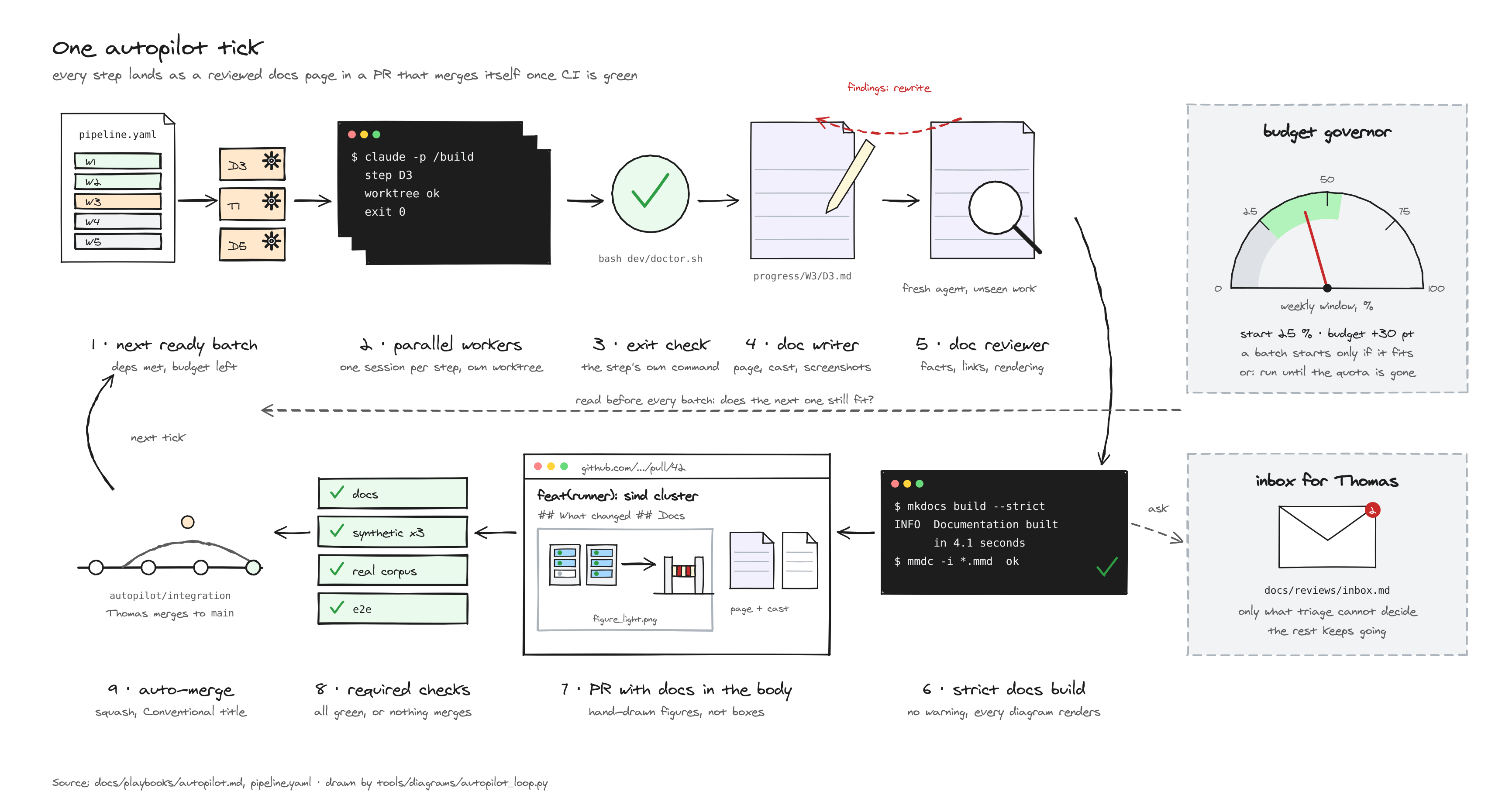
3.1 What each step kind leaves in the docs¶
| Step kind | Pages it must change | Figures and media |
|---|---|---|
review |
docs/reviews/<round>.md, plus its Progress page |
none required |
triage |
inbox and review files (status fields), plus its Progress page | none |
apply |
the owning specs, decisions/log.md, plus its Progress page with a before/after summary per finding |
a sketch when a mechanism changed |
spike |
docs/research/spike-<name>-<date>.md, plus its Progress page |
a cast of the commands that proved it; a sketch of the setup |
build (D, T, later code) |
the guide or reference page for what was built, the owning spec if behaviour was decided, plus its Progress page | a sketch for each new mechanism; a cast for each new CLI flow; screenshots for each new screen; a combined capture for a CLI-to-UI flow |
plan |
docs/plans/<id>.md, plus its Progress page |
a sketch of the milestone's architecture slice |
release |
the changelog block (§6) | the release's hero figure |
foundation (wave W0 only) |
its Progress page, written after the fact from the commits and the evidence kept in the session; the owning specs it changed | as for build; a figure or media that is not made yet is listed as a follow-up with the step that will make it |
3.2 Progress pages (docs/progress/<wave>/<step>.md)¶
One page per step, written by doc-writer during the step, not after. It has a fixed shape:
---
step: T3
wave: W3
status: done            # running | done | blocked
pr: 42
---
# T3 · Local SLURM with sind

!!! success "Done 2026-11-02 · PR #42 · 3 findings filed"

## What changed
## Why (link to the prompt and the decision)
## Evidence
## Figures and media
## Findings and open questions
- What changed: short bullets with links to the pages and files.
- Evidence: commands run, their results, and the exit check.
- Figures and media: the sketch pair, cast or screenshots.
- Findings and open questions: links to the review file and the inbox.
The Progress tab index is generated from the front matter of these pages (MkDocs hook, ordered by wave). The landing-page status strip uses the same data.
3.3 The docs gate (run by autopilot after every step, and by CI on every PR)¶
A step reaches done only when all of these pass:
mkdocs build --strict(broken links and anchors fail).- Every Mermaid block renders (
tools/docs/check_mermaid.py, which extracts the blocks and runsmmdc). - Diagram freshness: every
tools/diagrams/*.pyscript re-run gives byte-identical SVGs. The seeded RNG makes this testable; a figure whose script changed without its output, or the reverse, fails. - Media manifest: every screenshot, cast and video referenced from a page exists and is listed in
docs/assets/media.yamlwith its generator command. The churn guard (tools/media/check_churn.sh) rejects a mass change unlessSPECTIO_ALLOW_SCREENSHOT_UPDATE=1. - Required pages for the step kind (§3.1) changed, and the Progress page front matter is valid.
doc-reviewerverdict ≥approve(§4.2), stored in the Progress page front matter asreview: approve | changes | block.- Size budget: at most 5 MB of new media per PR (checked against the base branch in CI), videos ≤ 3 MB and ≤ 30 s each. GIF previews for PR bodies are generated on demand outside
docs/assets/and are not committed.
If the gate fails, the step goes back to doc-writer with the reviewer's notes. After two failed revisions, the step is blocked, with an inbox entry.
4. Writers and reviewers¶
4.1 Agents (.claude/agents/)¶
| Agent | Writes | Tools | Model |
|---|---|---|---|
doc-writer |
Progress pages, guide and reference pages, PR bodies, changelog drafts | Read, Grep, Glob, Edit, Write, Bash | opus |
diagram-artist |
tools/diagrams/<figure>.py and its outputs |
Read, Write, Edit, Bash | opus |
media-capture |
entries in tools/media/ (shots registry, cast scripts, combo scripts), docs/assets/ outputs, media.yaml |
Read, Write, Edit, Bash | sonnet |
doc-reviewer |
nothing in the docs; returns a verdict and findings | Read, Grep, Glob, Bash | opus |
Writers:
- Sources. Writers work from the step's actual outputs (diff, logs, test reports), never from the prompt alone.
- Style. Writers follow the repository style:
- plain English;
- short sentences;
- lists for scanning, tables for comparing;
- every external fact sourced, or marked [to be validated].
doc-reviewer:
- runs with a fresh context;
- receives only the changed pages, the step's outputs and this spec, not the writer's reasoning.
4.2 Review rubric¶
Each criterion is scored 0–2, with a one-line justification.
| Criterion | 2 means |
|---|---|
| Accuracy | every claim matches the diff, the logs or a cited source; commands were run |
| Completeness | the pages §3.1 requires are present; a newcomer could repeat the step |
| Ownership | the topic changed in its owning spec only; other pages link to it |
| Clarity | scannable; a page title says what it is; no unexplained jargon |
| Figures | a mechanism is drawn with pictograms, not boxes; labels legible in light and dark (reviewer opens the PNGs) |
| Media | screenshots match the current boards; casts replay; videos play and are short |
| Navigation | the page is reachable from the nav, the Progress index and its spec |
Verdict:
approvewhen every criterion is ≥ 1 and the total is ≥ 11 / 14;changesotherwise;blockfor any inaccuracy that would mislead a user, or a secret or personal data in media.
5. Media¶
5.1 Screenshots¶
The registry.
tools/media/shots.pyis a registry of named shots, like depictio'sdocs_screenshots.py.- It has
listandrun --shot NAME --theme light|darkcommands. - The viewport is 1440 × 900, or 1440 × 1180 for tall pages, plus 390 × 844 for phone shots.
Sources, by phase:
- Design phase: shots are rendered from
design/ui-canvasboards withtools/canvas/render.js. The boards have no dark variant, so design-phase shots are light only. Names are substituted fromtools/media/fixtures.yamlbefore rendering, so no real name, path or cluster appears (§5.5). - Implementation: the same names are taken from the running app with Playwright, against the seeded demo data.
Pairs and embedding.
- Shots are saved as WebP light/dark pairs.
- They are embedded with
#only-light/#only-dark, inside a link that opens the full image. Pages with many shots setglightbox: true.
5.2 Terminal casts¶
Generated, not recorded.
-
Each cast has a script,
tools/media/casts/<name>.yaml, with:- title and size;
- the steps (commands, narration comments, typing speed);
- output trimming.
-
tools/media/cast.pyruns the commands for real and writes an asciinema v2 file with synthetic, stable timestamps. - When the CLI changes, casts are regenerated in CI and the docs gate catches casts that no longer replay.
Embedding:
- markup:
<div class="asciinema-cast" data-cast="assets/casts/<name>.cast"></div>; - player:
asciinema.jslazy-loads asciinema-player 3.17.0 and remounts on Material's instant navigation; - theme:
spectio.
Tool choice. asciinema is preferred to VHS GIFs: the text stays selectable and the files are small. VHS can be added for GIFs in the README if needed.
5.3 Browser videos¶
Playwright record_video captures a scripted UI flow (open run → open gate → decide):
- WebM from Playwright, converted to MP4 (H.264) for compatibility, plus a GIF preview of at most 4 MB at 10 fps for PR bodies (generated outside
docs/assets/, not committed); - at most 30 s, 1280 × 720.
5.4 Combined terminal and browser captures¶
What it shows. One video shows a CLI action and its effect in the UI side by side. For example, spectio run … --gate qc in the terminal, then the gate opening in the browser and being approved, then the terminal resuming.
How it is made.
-
tools/media/combo.pydrives a Playwright page with two panes:- the asciinema player playing the cast;
- the browser pane, showing the app (or boards in the design phase) at timestamps set in
tools/media/combos/<name>.yaml.
-
The page is recorded with Playwright video and converted with ffmpeg.
- Captions come from the same YAML.
depictio has no equivalent (audit §4.4).
5.5 Data hygiene¶
- Media use only demo data and fixture users. No real emails, tokens, hostnames or paths.
doc-reviewerchecks the frames, andblocks on a leak.- Generators run against the seeded demo instance, which has fixed names (
demo-hpc,alice@example.org).
6. Changelog¶
Two layers, as in depictio.
- Layer 1, raw:
release-pleasewritesCHANGELOG.mdfrom Conventional Commit titles. Its output becomes the GitHub release body (dev-environment-and-testing.md§12). - Layer 2, curated:
docs/changelog/index.md. When the release PR opens,doc-writerdrafts the new block from the merged PR bodies, anddoc-reviewerreviews it in the release PR.
Block format (one per version, newest first, depictio's shape):
## [v0.3.0](https://github.com/weber8thomas/spectio/releases/tag/v0.3.0) · 2026-12-04

!!! success "Minor: gates on SLURM runs, decided from a phone"

### ✨ New
* **Stop at a QC gate on SLURM**: the runner pauses after `qc` and waits for a decision.
  See [Gates](../guides/gates.md#slurm) ([#57](https://github.com/weber8thomas/spectio/pull/57), [a1b2c3d](https://github.com/weber8thomas/spectio/commit/a1b2c3d)).

### 🚀 Improved
### 🐛 Fixed
### ⚠️ Breaking
### 📦 Images and packages
- Admonition type by release size:
successfor a minor release,infofor a patch,warningfor a release with breaking changes. -
Each bullet:
- a bold lead that says what users can now do;
- one sentence;
- links to the feature page, the PR and the commit.
-
Breaking changes come with a migration note.
7. Pull requests¶
7.1 Template (.github/pull_request_template.md)¶
The template keeps depictio's sections and adds Spectio's own. depictio's sections:
- summary;
- type;
- related issue;
- how it was tested;
- checklist.
Spectio adds:
- docs: pages changed, with preview links (Cloudflare preview of the PR);
- figures: sketch pairs embedded;
- media: a GIF or a link to the MP4;
- specs touched and decision-log entry;
- review verdict from
doc-reviewer.
7.2 Generated body¶
Generation. doc-writer writes the PR body from the step's Progress page.
Figure links. Figures are embedded with raw.githubusercontent.com URLs pinned to the PR head SHA. A pinned URL keeps showing the figure after the branch is rebased; while the repository is private, GitHub serves these URLs only to readers who have access.
Example:
## Summary
Local SLURM cluster with sind for scenario tests (T3).
## Docs
- [Progress · T3](https://pr-42.spectio.pages.dev/progress/W3/T3/) · [Dev environment §5](https://pr-42.spectio.pages.dev/specs/dev-environment-and-testing/#5-...)
## How it works

## Evidence
`pytest tests/slurm -q` → 14 passed · scenarios on sind: 11/11 · [cast](https://pr-42.spectio.pages.dev/assets/casts/sind-up.cast)
## Checks
- [x] docs build --strict · [x] mermaid · [x] diagrams fresh · [x] media manifest · [x] doc-reviewer: approve (13/14)
🤖 Generated with [Claude Code](https://claude.com/claude-code)
Preview links. They point at the PR's Cloudflare preview (https://pr-<n>.spectio.pages.dev/…). previews.yml comments them on the PR, together with the "Open in Codespaces" link.
7.3 PR checks (docs.yml, required)¶
- strict build;
- Mermaid render;
- diagram freshness;
- media manifest and churn guard;
- PR body lint: the required sections are present;
featanddocsPRs that touchdocs/specs/ortools/have at least one figure, unless labelledno-figurewith a reason; - Conventional Commit title.
8. Auto-merge¶
Policy.
-
A PR merges automatically (squash, through GitHub's native auto-merge) when:
- all required checks pass (§7.3, plus the pipeline workflows the PR touches);
- its
doc-reviewerverdict isapprove, posted as a PR review by the bot account; - it has no
needs-humanlabel.
-
On
autopilot/integration: auto-merge is always on. - On
main: auto-merge is on only when the repository variableAUTOMERGE_MAINistrue. Thomas sets that variable, which is the switch from "humans merge to main" to "CI merges to main".
Never auto-merged:
human_gatesteps;- a release PR at 1.0.0 or above (the 1.0 gate,
dev-environment-and-testing.md§14). A 0.x release PR auto-merges like the others onceAUTOMERGE_MAINistrue. The autopilot merges one at the end of a milestone or of a wave that changed the product, not after everyfeat; - PRs that change
.github/workflows/,.claude/settings.json, auth or secrets code, orpipeline.yamlstatuses.
Who configures it. Thomas sets up branch protection and the auto-merge setting once, with the gh commands in docs/playbooks/autopilot.md §8. Agents cannot change repository settings or their own permissions.
9. Generated reference (from M1)¶
API reference.
- Generation. depictio's release workflow is copied: import the app inside the released image in a mode that needs no database, dump
app.openapi(), check it withjqand a minimum path count, stamp it with the version, and open a docs PR (audit §1.6). - Requirement. This needs the no-database import mode in
spectio-serverfrom day one (architecture-plugins-and-packaging.md§6).
CLI reference. Generated from the Typer command tree (mkdocs-typer or a small generator).
Configuration reference. Generated from the Pydantic settings models:
- one table per plugin kind;
- for each setting: environment variable, TOML key, default and description.
10. What "verified" means for docs¶
A docs claim is verified when one of these holds:
- the command in it was run in the step and its output is in the Evidence section or a cast;
- the screenshot was generated from the current board or app build;
- an external fact links its source.
doc-reviewer samples at least three claims per page and re-runs them when they are commands that run in under a minute.